


PDF Annotation Tools: A Complete Guide to Marking Up and Reviewing PDF Documents

Introduction
PDF files are everywhere. Whether you’re a student reviewing lecture notes, a professional checking contracts, or a team collaborating on reports, there are times when you need to add comments, highlight important information, or make notes directly on a PDF document. This is where PDF annotation tools become useful.
PDF annotation tools allow users to interact with PDF files without changing the original content. You can highlight text, add comments, draw shapes, underline important sections, and collaborate with others more efficiently.
In this guide, we’ll explain everything you need to know about annotation, including their features, benefits, use cases, and how to choose the right one.
What Are PDF Annotation Tools?
This is a software applications or features that let users add notes, comments, highlights, drawings, and other markup elements to PDF documents.
Instead of editing the actual content of a PDF, This tool add an extra layer of information on top of the document. This makes them perfect for reviewing, collaborating, and sharing feedback.
Think of them as digital versions of a pen, highlighter, and sticky notes combined into one tool.
Why Are PDF Annotation Tools Important?
It’s help people work faster and communicate more clearly.
Here are some key reasons why they are important:
- Improve document review processes
- Make collaboration easier
- Reduce printing and paper usage
- Help students study more effectively
- Allow teams to share feedback quickly
- Keep comments organized within the document
Without annotation tools, users often have to send separate emails or documents to explain their feedback, which can create confusion.
Common Features of PDF Annotation Tools
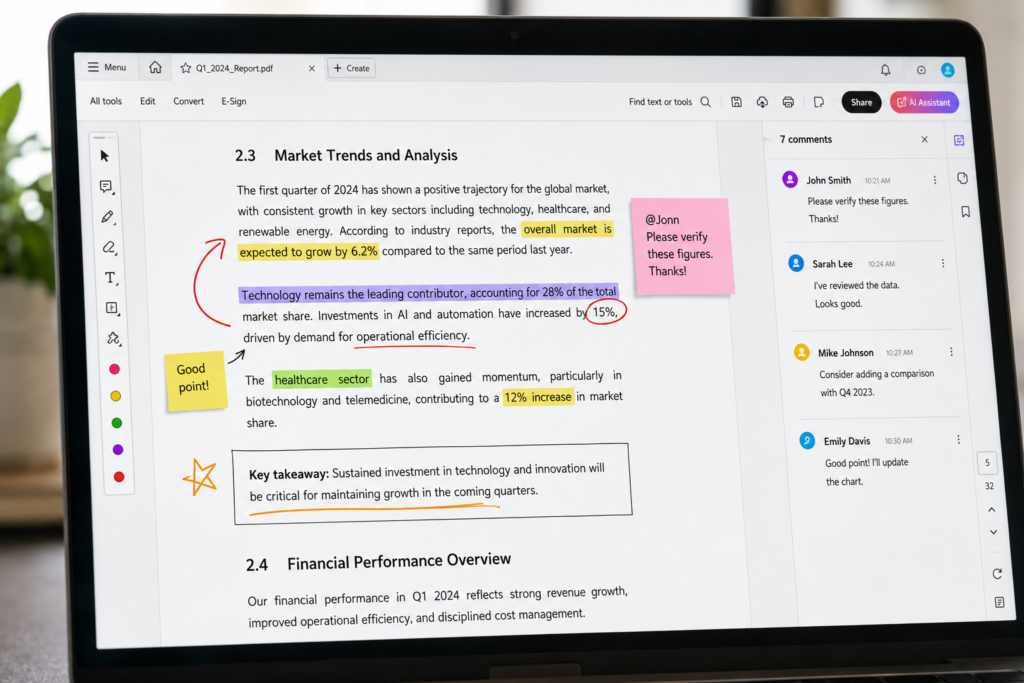
Most PDF annotation tools include a variety of markup and commenting features.
Text Highlighting
Highlighting helps users mark important information in different colors. It’s commonly used by students, researchers, and legal professionals.
Sticky Notes
Sticky notes allow users to attach comments to specific sections of a document without cluttering the page.
Underlining and Strikethrough
These tools help reviewers emphasize text or suggest content removal.
Drawing Tools
Users can draw freehand shapes, arrows, circles, and sketches directly on the PDF.
Text Comments
Text comments provide detailed feedback and explanations within the document.
Stamps
Many annotation tools include stamps such as:
- Approved
- Rejected
- Reviewed
- Confidential
- Draft
These are especially useful in business workflows.
Signatures
Some annotation platforms allow users to add digital signatures to documents.
Types of PDF Annotations
Different situations require different types of annotations.
Highlight Annotations
Used to emphasize important content.
Comment Annotations
Used to provide feedback, suggestions, or explanations.
Shape Annotations
Include rectangles, circles, arrows, and lines to point out specific areas.
Ink Annotations
Freehand writing or drawing using a mouse, stylus, or touchscreen.
Text Box Annotations
Allow users to place visible text directly on the page.
File Attachments
Some advanced tools let users attach supporting documents to annotations.
Benefits of Using PDF Annotation Tools
Better Collaboration
Teams can review documents together and share feedback in one place.
Increased Productivity
Annotations eliminate the need for long email chains and separate review documents.
Improved Communication
Comments are attached directly to relevant sections of the document, reducing misunderstandings.
Enhanced Learning
Students can highlight concepts, add notes, and organize study materials more effectively.
Cost Savings
Digital annotation reduces printing costs and paper waste.
Who Uses PDF Annotation Tools?
PDF annotation tools are used across many industries.
Students
Students use annotations to:
- Highlight important information
- Add study notes
- Mark assignments
- Review lecture materials
Teachers
Teachers annotate assignments and provide feedback to students.
Businesses
Companies use annotations during:
- Contract reviews
- Project approvals
- Document collaboration
- Internal audits
Legal Professionals
Lawyers often review lengthy contracts and legal documents using annotations.
Healthcare Organizations
Medical professionals use annotated PDFs for reports, research papers, and administrative documents.
Designers and Architects
Design teams use PDF markups to discuss revisions and project changes.
Key Features to Look for in a PDF Annotation Tool
When choosing a PDF annotation tool, consider these features:
Ease of Use
A simple and intuitive interface helps users work more efficiently.
Cloud Storage Integration
Support for services like Google Drive, Dropbox, and OneDrive makes document management easier.
Collaboration Features
Real-time collaboration allows multiple users to review documents together.
Cross-Platform Compatibility
The tool should work on desktop, mobile, and web browsers.
Security
Look for features such as:
- Password protection
- Encryption
- Access controls
Offline Access
Offline functionality ensures productivity even without an internet connection.
PDF Annotation Tools vs PDF Editing Tools
Many people confuse annotation tools with editing tools.
PDF annotation tools allow users to:
- Highlight text
- Add comments
- Draw shapes
- Insert notes
PDF editing tools allow users to:
- Modify existing text
- Change images
- Rearrange pages
- Create new PDF content
Annotations focus on feedback and review, while editing focuses on changing the document itself.
Best Practices for PDF Annotation
To get the most value from annotations, follow these best practices:
Keep Comments Clear
Use simple language and be specific about your feedback.
Use Consistent Colors
Assign colors for different purposes, such as:
- Yellow for important information
- Green for approved content
- Red for issues or corrections
Avoid Over-Annotating
Too many annotations can make documents difficult to read.
Organize Feedback
Group related comments together whenever possible.
Review Before Sharing
Check annotations to ensure they are accurate and relevant.
Future of PDF Annotation Tools
The future of PDF annotation tools looks promising.
Emerging trends include:
- Artificial intelligence-powered suggestions
- Automated document reviews
- Real-time collaboration enhancements
- Voice-based annotations
- Advanced cloud integration
- Improved mobile annotation experiences
As remote work and digital collaboration continue to grow, This tool will become even more important for businesses, educators, and individuals.
PDF annotation have transformed the way people review, share, and collaborate on documents. From simple highlights and comments to advanced collaboration workflows, these tools help users communicate clearly and work more efficiently.
Whether you’re a student studying for exams, a business professional reviewing contracts, or a team working on projects, PDF annotation tools can simplify document management and improve productivity. By understanding their features, benefits, and best practices, you can choose the right solution and make the most of your PDF workflows.
